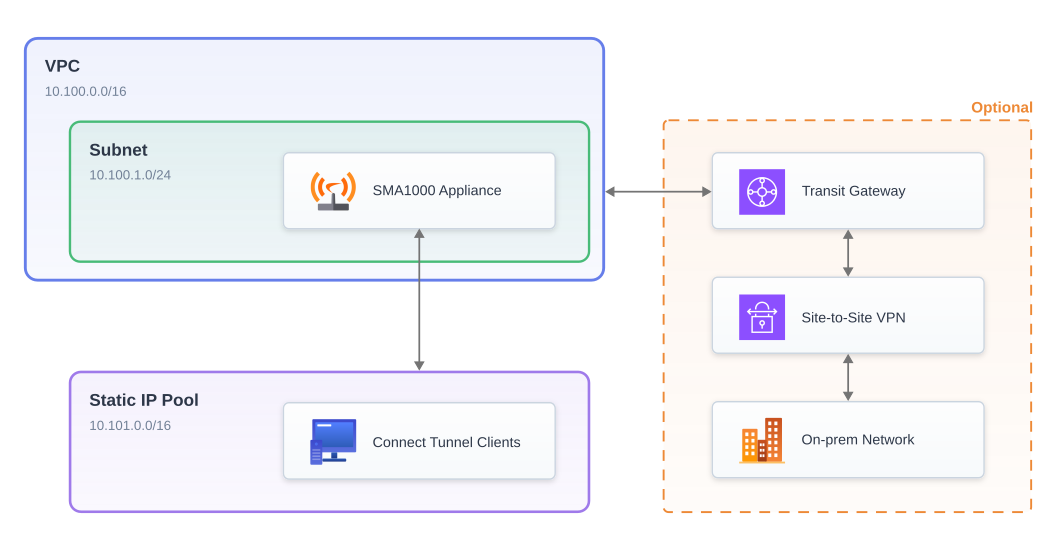
This CloudFormation template serves as the reference deployment for an SMA1000 virtual appliance in AWS. In addition to deploying an SMA1000 appliance, it also configures a static IP pool for Connect Tunnel clients, an optional site-to-site VPN connection to a private on-prem network, and the routing required to make it all work.
You can use the following link to deploy this template via the AWS web console:

KeyPair - EC2 SSH key pair to add to authorized_keys on SMA1000 appliance.ApplianceVpcCidr - Network address for appliance VPC in CIDR notation.ApplianceSubnetCidr - Network address for appliance subnet in CIDR notation.RedirectAll - Enable "redirect all" tunnel mode on the SMA1000 appliance using an AWS-managed NAT Gateway? This option is not compatible with IPv6 parameter as AWS NAT Gateways do not support outbound IPv6 traffic.Ipv6 - Enable IPv6? Not compatible with RedirectAll parameter as AWS NAT Gateways do not support outbound IPv6 traffic.StaticPoolCidr - Private IPv4 network address for static pool in CIDR notation. All traffic to this CIDR will be routed through the SMA1000 appliance.StaticPoolV6Cidr - Private IPv6 network address for static pool in CIDR notation. Required if IPv6 is enabled. All traffic to this CIDR will be routed through the SMA1000 appliance.SiteToSiteVpn - Create IPsec site-to-site VPN connection to a remote gateway device?SiteToSiteRemoteGatewayPublicIp - Public IP address of remote gateway device for site-to-site VPN. Required if site-to-site VPN connection is enabled.SiteToSiteRemoteGatewayBgpAsn - Remote gateway device ASN for site-to-site VPN. Required if site-to-site VPN connection is enabled.SiteToSitePreSharedKey - IPsec pre-shared key for site-to-site VPN. Required if site-to-site VPN connection is enabled.SiteToSiteRemoteCidr - Remote IPv4 network address for site-to-site VPN. Required if site-to-site VPN connection is enabled. All traffic to this CIDR will be routed through the site-to-site VPN connection.This template has 2 unconditional outputs:
AppliancePublicIp - Public IP address of SMA1000 appliance.ApplianceInstanceId - Instance ID of SMA1000 appliance. This is also the password for both the admin and tunnel users.If you have enabled the site-to-site VPN connection, there are 2 additional outputs:
TunnelPublicIp1 - Public IP for AWS side of site-to-site VPN tunnel #1.TunnelPublicIp2 - Public IP for AWS side of site-to-site VPN tunnel #2.If you have enabled the site-to-site VPN connection then you also need to configure your remote gateway device.
The template outputs TunnelPublicIp1 and TunnelPublicIp2 are the public IPs on the AWS side of the site-to-site
VPN tunnel that you need to configure your device to connect to. Only one tunnel needs to be active for the solution
to work, although AWS recommends configuring both for redundancy.
Login with the username admin and the password indicated in the ApplianceInstanceId template output.
Connect Tunnel access is configured on the SMA1000 appliance and ready to use immediately after the deployment
completes. Login with the username tunnel and the password indicated in the ApplianceInstanceId template output.
If the site-to-site VPN connection is enabled, an SMA1000 access policy allowing the tunnel user access to the
remote network CIDR is created for you automatically. If you wish to allow access to other internal resources or
to define more restrictive policies for the site-to-site VPN connection, then you may need to modify the appliance
configuration. See the SMA1000 administration guide for more information.